Data structure
Neuroimaging experiments generate a complex set of data that can be organized in many different ways. For many years, the research community has been trying to find a way to effectively store and manage the data collected from the fMRI scanner.
Brain Imaging Data Structure
Brain Imaging Data Structure (BIDS) was originally designed to describe and apply consistent naming conventions to raw data (Gorgolewski et al., 2016).
Derivatives of the raw data (other than products of DICOM to NIfTI conversion) MUST be stored separately from the raw data to protect the raw data from accidental changes.
Structuring your data according BIDS also enables to use automatic analysis tools such as fMRIPrep or other BIDS Apps.
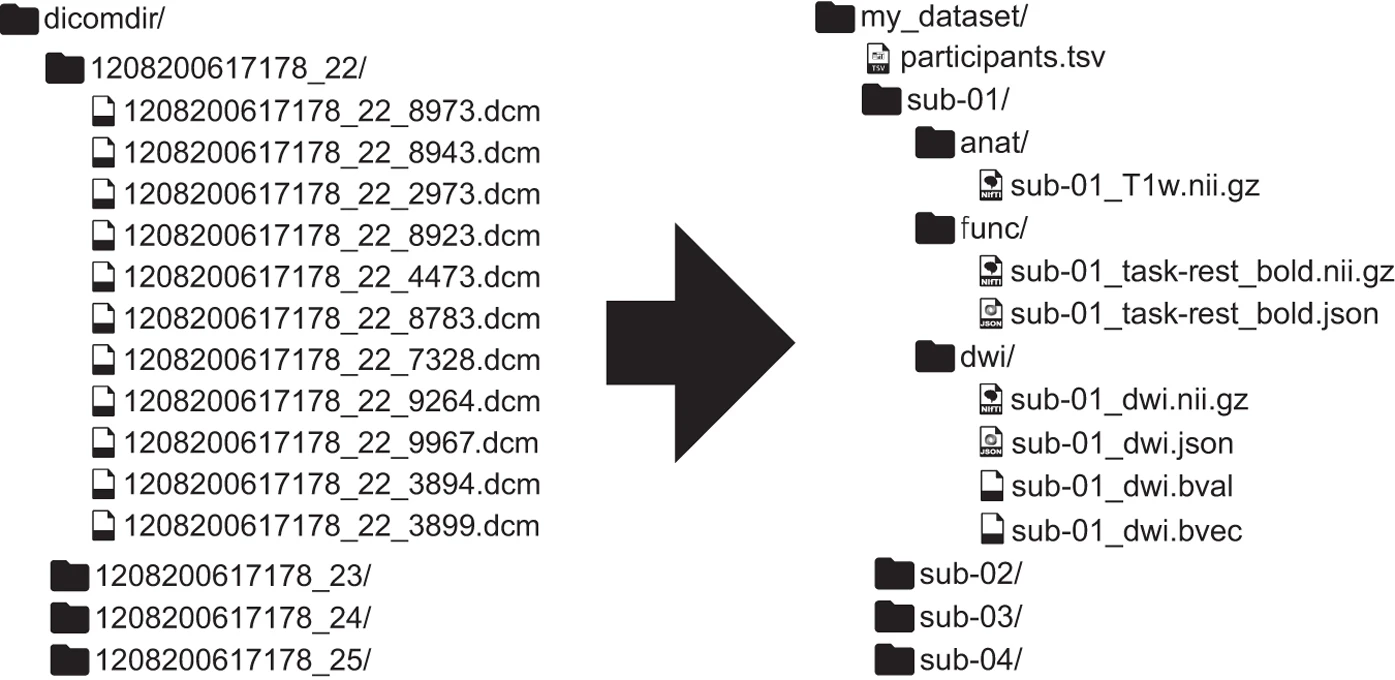
Figure 1. From unstructured data (left) to a BIDS-structured dataset (right).
To understand the organization of files and their format, refer to the BIDS documentation.
Create a BIDS compatible dataset
Here we summarize the steps necessary to create a BIDS-compatible dataset as described by Gorgolewski et al., 2016.
Convert DICOM files to NIfTI
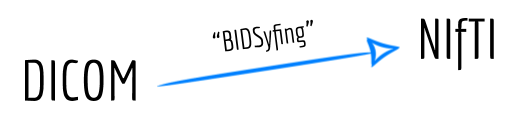
Data collected with an fMRI scanner are initially stored in DICOM format. In the first step, we have to convert our data from DICOM to NIfTI format.
See also
To perform such file conversion, we recommend using dcm2niix format, which is an open-source software that runs on macOS, Linux, and Windows, typically without requiring any third-party dependencies. At the bottom of the documentation available on GitHub, you can find other linked alternatives, e.g. HeuDiConv which may facilitate the process of creating BIDS validate datasets and additionaly, this converter does integrate with DataLad by placing converted and original data under git/git-annex version control system.
Create folder structure
BIDS relies on a particular folder structure and naming scheme of files. We start with creating the folder structure with one folder for each participant named ‘sub-01’, ‘sub-02’ and so on. When we have multiple scanning sessions, as in longitudinal fMRI studies, each subject subfolder should contain a ‘ses-<label>’ subfolder, where label coresponds to the ID of a session. Inside each subject/session folder, we create subfolders such as: ‘anat’ for anatomical scans, ‘dwi’ (for diffusion scans),‘func’ (for task fMRI) and ‘fmap’ for field mapping. After creating the base folder structure, we have to move specific scans to an accurate folders and rename it.
Rename files
Besides organizing your folders, you have to change names of your neuroimaging data files (.nii.gz) according to BIDS convention.
When data have been collected in several sessions for each subject, the name of the filename must start with the string
sub-<label>_ses-<label>.If the session level is omitted from the folder structure, the filename must begin with the
sub-<label>, without theses-<label>.
sub-<label> corresponds to an entity, where <label> corresponds to that entity’s unique identifier, for example 01. The same goes for a session entity with its ses- key and <label> value.
sub-01
    ∟ anat
     #data type
       ∟ sub-01_run-01_Tww.nii.gz
        #entities, suffix and exntension
Every folder and file name has to be renamed following the BIDS standard. See more information here.
Add remaining data
We need to provide details on the experimental paradigm for modality-specific files. To see possibilities, go here.
BIDS aspires to describe a majority of datasets, but acknowledges that there will be cases that do not fit the present version of BIDS.
Add missing metadata
You have to provide the name of each task, but it is optional to add information such as task instructions and description. Also, it is recommended to include external ontology such as Cognitive Atlas or Cognitive Paradigm Ontology to clarify research purposes.
Validate the dataset
BIDS Validator has been developed to easily check whether a dataset accurately follows the BIDS standard. Once the dataset is organized into BIDS format, the BIDS Validator can be used to check if any of the required or recommended metadata are missing.
Note
We recommend using the Web version of BIDS validator with no need to install additional software. To validate your data:
Open Google Chrome or Mozilla Firefox (the only supported browsers).
Go to BIDS Validator and select a folder with BIDS dataset.
If the validator seems to work longer than a couple of minutes, open developer tools and report the error in the designated place.
The BIDS validator performs the validation on the client side (no data is uploaded or shared) so it is suitable for sensitive datasets that are not intended to be publicly shared.
Data format conversion
Developers created python toolkit BIDScoin that converts raw neuroimaging datasets to .nifti/.json /.tsv format, organised following the BIDS standard. All information about installation and processing datasets can be found on readthedosc.io. Issues can be reported on GitHub repository.
BIDScoin requires the data source to be organized according to a BIDS folder structure standard. However, data collected in folders can have various formats.
Having your data structurized, you can start converting data according to BIDS standard. It can be done through (1a) the bidsmapper, (1b) the bidseditor, (2) the bidscoiner, command-line tools.
The bidsmapper starts by making a map of the different kind of datatypes (scans) in your source dataset with so-called bidsmap, which tells how exactly to convert specific data format into a BIDS data.
To check how the command-lines work, visit the BIDScoin workflow.
Note
After the successful run of BIDScoin there are couple more steps to take. Even though, there are only few of them and they require you to:
Adding missing meta-data (i.e. refill
dataset_description.jsonandREADMEfiles) to fulfill your dataset.Examine data sharing utilities, such as multi-echo combination (echos separation) and defacing.
Make sure that your dataset meet the requirements with BIDS Validator.
BIDScoin’s documentation allow you to go through the demonstration of using the tool, so do not hesitate to make sure that you are doing everything in a right way.